If you've ever had a pour ready to go while one permit sits in a city inbox, another renewal lives in someone's email, and a third PDF is buried in a shared drive, you already know the problem. The job isn't waiting on concrete, labor, or material. It's waiting on paperwork that's spread across too many places and too many people.
That's where permit management software earns its keep for contractors. It turns permit work from a memory game into a live system, which matters when one missed renewal or one wrong jurisdiction form can stall a crew, a crane, or a schedule that's already tight.
When Spreadsheets Stop Working on Multi-Jurisdiction Jobs
A superintendent managing three permits across two cities doesn't need another folder tree. They need to know which authority owns which approval, which documents are current, and who's on the hook if a renewal slips. A spreadsheet can list the items, but it can't stop a project engineer from missing a deadline because the reminder sat in a deleted inbox chain.
The pain usually shows up in the field, not in the office. A concrete crew is ready to mobilize, the environmental permit hasn't cleared, and somebody is trying to confirm whether the right-of-way submittal needs one more attachment. That kind of handoff breaks down fast when permit status lives in email, file names, and memory instead of one system.
Practical rule: if two people have to “check with each other” before a permit can move, you're already outgrowing spreadsheets.
Multi-jurisdiction work makes this worse because every authority plays by slightly different rules. Contractor-side permit work isn't just about filing forms, it's about keeping a live record of what's approved, what's pending, and what still needs backup documentation before a crew shows up on site. That's why software becomes less of a convenience and more of an operating layer.
The market signal matches what contractors already feel on the ground. One market snapshot projects permit management software to grow from about $4.8 billion in 2025 to $10.6 billion by 2034, with cloud-based solutions at 54.3% of new contract awards globally in 2025, up from 38.7% in 2022 (Dataintelo market report). That kind of movement usually happens when a workflow has become too important to leave in spreadsheets and inboxes.
What Permit Management Software Actually Does
At its simplest, permit management software is a shared job hub for permits. It keeps the permit request, site location, supporting documents, fee records, review status, and history of changes in one place so the team isn't chasing different versions across folders, texts, and email threads. Contractors use it to see what's live, what's stuck, and what needs action before a delay turns into an idle crew.
A solid system usually follows a cloud/SaaS model, which matters because field teams don't sit at one desk all day. Research on a smart permit framework describes a cloud-based front end, a permit-processing module, and an analytics layer, with rule-based logic that determines which permits and documents are required before submission (SJSU smart permit framework). In plain terms, the software can flag missing items before a reviewer sends the package back.
For contractors, that upstream checking is the core value. If the system knows a project type, jurisdiction, or permit class, it can prompt the team for the right forms and attachments before anyone presses submit. That cuts the back-and-forth that usually eats up time between the office, the field, and the authority having jurisdiction.
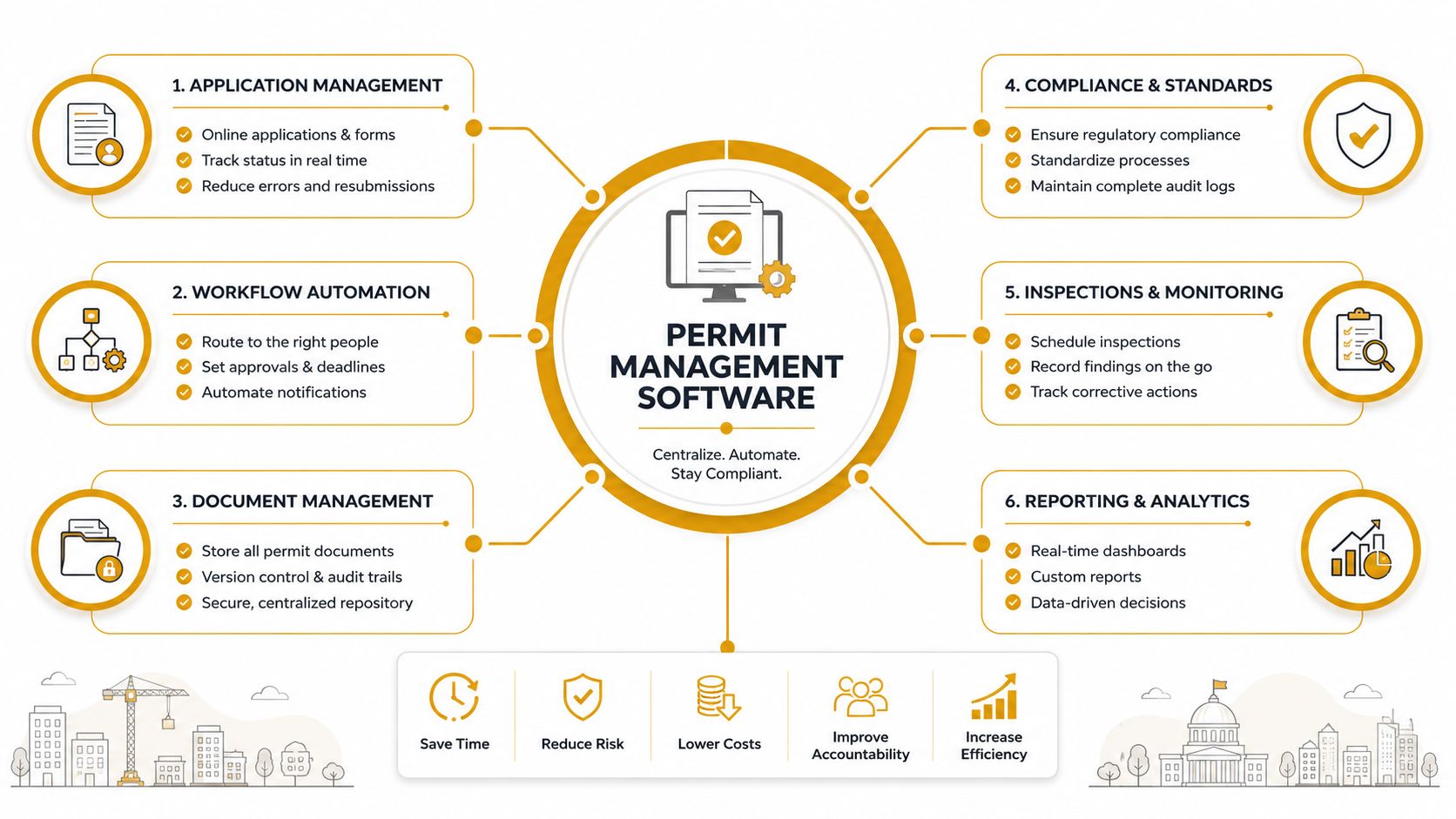
A useful way to think about it is this, the software isn't just storing permits. It's enforcing the sequence around them, so the right people see the right task at the right time.
One market report says more than 71,000 businesses globally adopted permit management solutions in 2024, a 28% increase from 2023, and that permit processing time fell by an average of 47% among adopters (Market Growth Reports permit management market). Those figures don't tell you how your jobsite will run, but they do show why this category has moved beyond record-keeping.
Key Features and Integrations That Matter on a Job Site
Contractors should not buy permit software like they are picking a generic office app. The features that matter are the ones that keep a job from stalling when one permit depends on another. If the tool cannot handle active jobs, field access, and document discipline, it will not help much when a pour is waiting on approval.
The features that earn their place
Centralized permit records are a must. You need one record that ties together the permit number, jurisdiction, site address, renewal date, and current status, because nobody on a busy job has time to piece that together from five different systems.
Automated renewal alerts matter more than many teams expect. A permit expiring on paper is one thing, but a permit expiring in the middle of a live sequence can stop inspections, deliveries, or follow-on work. A system that flags expiring items before they go stale gives the project team time to act.
Document version control is another hard requirement. On real jobs, people do not just need “the plan,” they need the current plan, the current attachment, and the current revision that matches what was submitted. If the software cannot keep those versions clean, the field will keep working from old files.
Mobile access matters because permits are not only touched in the trailer. Foremen, project engineers, and coordinators need to check status, upload photos, or confirm a missing document from the site, not after they get back to Wi-Fi.
If the field cannot use it, the office will end up doing double entry.
Where integrations pay off
Integrations are where the tool stops acting like a database and starts acting like part of the job workflow. Builders need software that fits multi-jurisdiction execution and connects with project systems like Procore or Autodesk Construction Cloud. That matters when permit status has to reflect the project schedule.
Here is the practical version for concrete work. If a washout containment rental, SWPPP note, or jurisdiction-specific attachment lives outside the permit file, someone will forget it. When the software connects permit records to project documentation, your team can keep supporting items with the permit instead of hunting them down after a reviewer asks for them.
| Feature | What It Does | Why It Matters on a Concrete Job |
|---|---|---|
| Centralized permit record | Stores permit details, dates, and status in one place | Keeps the team aligned when several authorities touch the same pour |
| Renewal alerts | Flags permits before they expire | Helps avoid work stoppages tied to lapsed approvals |
| Version control | Keeps current documents separate from old ones | Prevents crews from building off the wrong submittal set |
| Mobile access | Lets field users view or update records onsite | Saves time when a foreman or PM needs answers in the field |
| Fee tracking | Tracks payments and outstanding charges | Stops avoidable delays when a submittal is held for payment |
| Integrations | Connects to project tools and shared workflows | Keeps permit status tied to the live job, not a separate tracker |
Government Platforms Versus Contractor Workflow Tools
A contractor on a live job does not shop for permit software the way a city clerk does. A government permitting platform is built to manage intake, reviews, routing, and records across departments. A workflow tool for contractors has to keep permits moving across jurisdictions, tie them to the schedule, and make the status visible to the people running the work.
That split becomes obvious in a demo. A municipal buyer wants to know how applications move between planning, inspections, and records. A contractor wants to know whether the system can hold multiple active permits at once, separate work by project manager, and keep the right attachments tied to the right job. Those questions point to very different products.
The operational difference is just as clear in day-to-day use. Municipal software tends to be stronger on public intake, internal approvals, and department controls. Contractor software has to handle faster handoffs between sites, authorities, and project systems, because the job is coordinating work across projects, not serving the public front end.
Guideflow's buyer guidance is useful because it separates contractor needs from municipal needs, and it highlights multi-jurisdiction execution, integrations, and status tracking for contractors, while municipalities focus on end-to-end lifecycle management (Guideflow permitting software guidance). That distinction should shape every vendor conversation. If the product keeps centering resident intake and public agency routing, the fit is probably wrong for contractor workflow.
Practical test: ask the vendor to show how a permit moves from bid or precon through submission, review, approval, and renewal on a live project. If they keep spending the demo on intake forms, the tool is probably built for the other side of the table.
The right contractor tool should act like a project control layer. It needs to keep many permits moving at once, surface blockers early, and hold the permit record close to the work that depends on it. If it cannot do that, it is missing the problem contractors need solved.
Vendor Evaluation Checklist and Cost Considerations
A vendor call works better when it feels like a jobsite coordination meeting, not a polished software demo. You are checking whether the product fits how your team moves permits, how much handholding it will need, and how painful the shift will be from the system you use now. The sticker price rarely tells the full story.
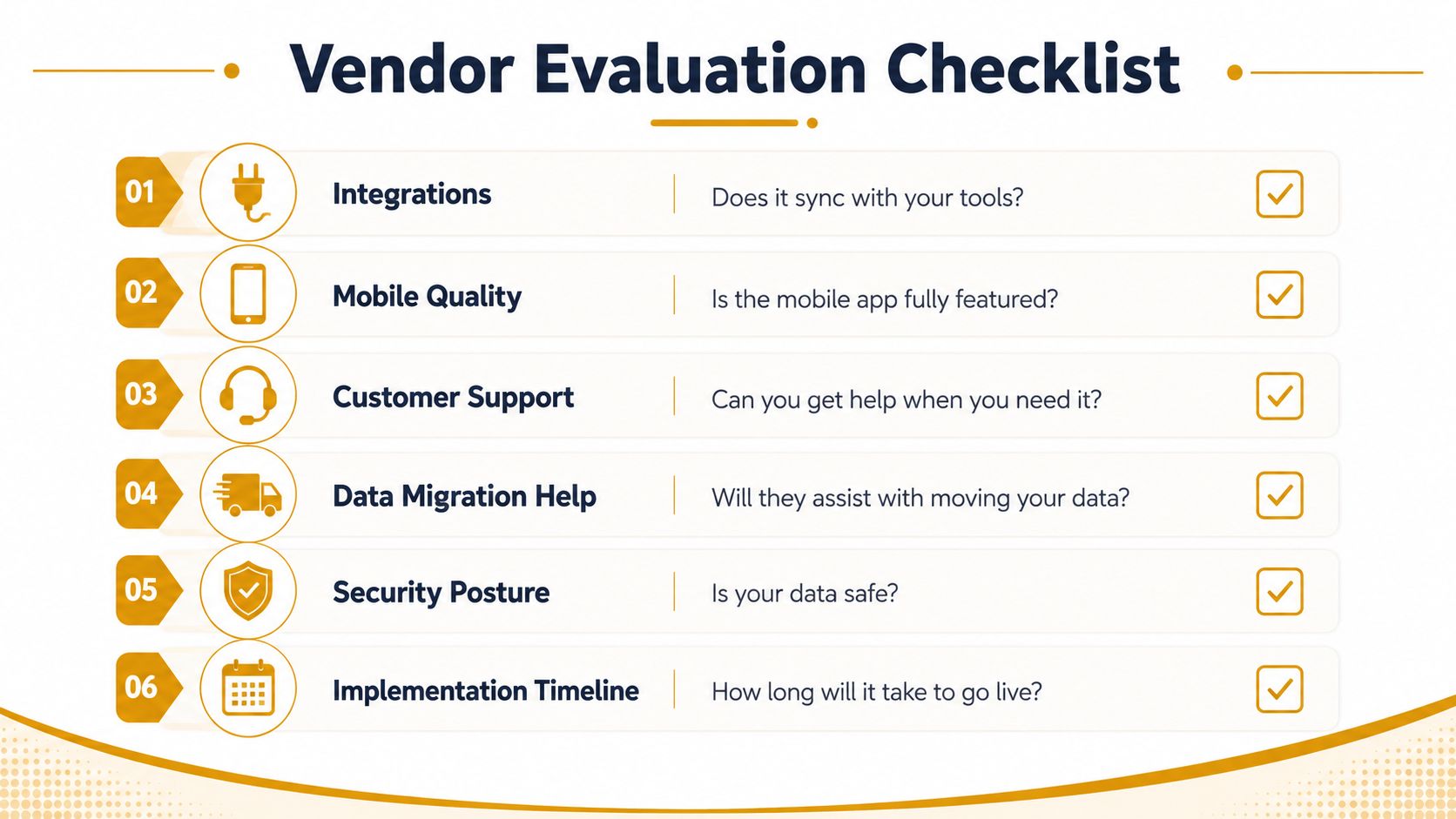
Questions to ask before you buy
- Integrations: Does it connect with your project tools, document storage, and schedule software without extra manual entry?
- Mobile quality: Is the mobile app fully featured, or just a stripped-down viewer?
- Customer support: Can you get help when the team is stuck on a live submission?
- Data migration help: Will they help move old permit records, or leave that work to your staff?
- Security posture: Is your data protected in a way that fits your company policies and client requirements?
- Implementation timeline: How long will it take to go live, and what has to happen before that?
Ask for a live walk-through of a concrete or washout-related permit path if that work is part of your operation. A vendor that can show how a submittal, revision, and approval move across sites, agencies, and project systems will usually tell you more than one that only demos a clean intake screen. If the product cannot keep pace with field changes, it will create another inbox for your coordinators to babysit.
Cost is usually a mix of subscription pricing, user access, setup, and migration work. A cloud platform may look affordable on paper, but if your team has decades of legacy permits spread across paper files and old systems, the true cost includes cleanup and transfer work. Independent adoption research points to procurement cycles of 12 to 24 months, municipal budget constraints, and the burden of moving decades of legacy permit data as major barriers in larger organizations (MCC Innovations legacy replacement guide).
The market also gives you a useful signal on vendor investment. Analysts at Market Growth Reports estimate the permit management market at $305.52 million in 2024 and project $686.37 million by 2033 with a 9.5% CAGR (Market Growth Reports permit management market). That does not tell you which product to buy, but it does show the category has enough momentum that vendors are likely to keep pushing product depth.
Bottom line: budget for the move, not just the license. If your proposal only covers subscriptions, it is incomplete.
Implementing the Software Without Breaking Your Workflow
The rollout is the project. If implementation gets treated like a quick admin task, the field will keep working around the tool instead of using it. The safer approach is a phased launch that matches how permit work moves between coordinators, project managers, superintendents, and admins.
Start with data cleanup and a pilot
Start by auditing what you already have. Separate active permits, expired permits, and dead records before migration begins, because a messy import just recreates the same confusion in a new system. Legacy data is usually the slow part, especially when old files sit in paper archives, shared drives, and someone's inbox.
Then pick one pilot project with enough complexity to prove the software is useful, but not so much risk that a bad setup can derail the rollout. The pilot should include a real permit path, at least one renewal, and a field user who will work in the system. If the pilot only covers clean office work, it will not show how the tool behaves under pressure or how much coordination it saves when a job changes in the field.
Train the people who touch permits, not just leadership
Training has to reach the people who submit, review, and chase permits every day. That usually means project engineers, permit coordinators, admin staff, and the PMs who end up answering status questions from the field. Leadership can approve the purchase, but the end users decide whether it sticks.
Train on the job sequence, not on menus. Show how a request gets created, where documents live, who gets notified, and what happens when a reviewer asks for more information. That keeps the training tied to actual work instead of abstract software features.
Connect it to the tools people already trust
Integration keeps the software from becoming one more place to log in. If your company already uses project management or document systems, connect those early so permit data does not get re-entered by hand. The goal is to cut friction, not move it to a different screen.
The deployment mix also matters for setup choices. The market has already shown that cloud delivery is the default path for many vendors, which usually means faster rollout, simpler access for distributed teams, and fewer internal IT handoffs during implementation. For contractors, that matters because the permit record needs to follow the work, from the office trailer to the superintendent in the field, without creating another layer of manual updates.
A Worked Example for Concrete and Washout Containment
A concrete subcontractor starts a foundation pour in one county, but the job touches more than one authority. The building permit is in review, the environmental paperwork needs a renewal date tracked, and the right-of-way sign-off matters because trucks will stage near a public corridor. Without software, that stack turns into a chain of follow-up calls and half-trusted PDFs.
With permit management software, each permit sits in one project record. The office uploads the building submittal, attaches the washout containment specs as a supporting document, and logs the site location, fee status, and responsible person. If the environmental permit needs a renewal or extra documentation, the system can flag it before the field team learns about the problem the hard way.
The washout containment piece matters because it's often treated like a side task when it's really part of site compliance. A crew may be focused on the pour, while the paperwork trail needs to show how slurry will be contained and what supporting equipment is on site. A structured permit file keeps those details tied to the project instead of scattered across a text thread and a rental confirmation.
One smart workflow is to link the permit record to the project schedule. When the building approval clears, the PM sees it immediately. If the environmental reviewer pushes back, the status stays visible to everyone who needs to know, instead of being buried in one coordinator's inbox.
The best setups don't just store permit data. They keep the work visible enough that no one has to guess what's approved and what still needs attention.
That's the contractor-side payoff. The team can move from “Do we have the paperwork?” to “What's left before we mobilize?” and that shift saves a lot of noise on live jobs.
Your Next Steps and a Quick-Reference Checklist
If your permit work is still light, a spreadsheet may be enough for now. Once you're juggling multiple jurisdictions, renewals, and field dependencies, the manual approach starts costing more in time and mistakes than it saves in software fees. That's the point where buying becomes a workflow decision, not a tech preference.
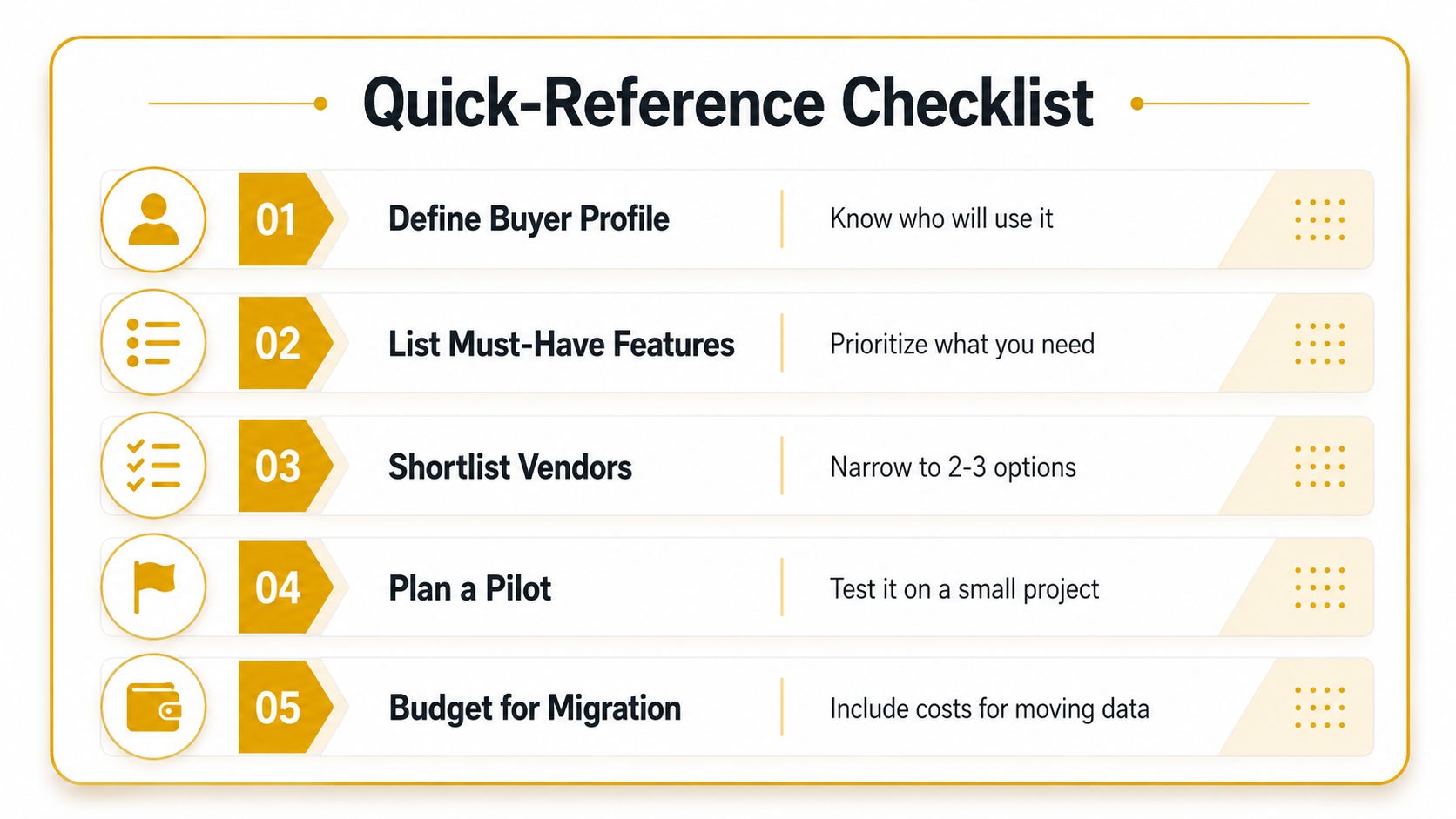
- Define buyer profile: Know who will use it and whether you need contractor workflow support or a broader platform.
- List must-have features: Prioritize integrations, mobile access, renewal alerts, and document control.
- Shortlist vendors: Narrow it to two or three options that fit your project mix.
- Plan a pilot: Test the tool on a real project before committing company-wide.
- Budget for migration: Include the cost of moving old permit data, not just the subscription.
If your team is still chasing permit status through shared drives and inboxes, it's time to look at a system that can keep the job moving. Reborn Rentals helps contractors keep concrete washout containment organized on active sites, which pairs naturally with the same kind of documentation discipline permit management software depends on. Visit Reborn Rentals when you need a practical rental partner that understands clean sites, compliance-minded workflows, and the pace of real job work.