The truck is due before the concrete crew arrives, but the rental confirmation still shows only a machine name, a daily rate, and a delivery address copied from an old invoice. Nobody has checked the gate, the overhead lines, the slope, or where washout will go. That's how an online rental turns into a delayed pour, a waiting crew, and a bill with charges nobody approved.
Construction equipment rental online works best when you treat the checkout as a logistics order, not a shopping cart. The rental market remains a major procurement channel, with one forecast estimating the global construction equipment rental market at USD 129.1 billion in 2025, reaching USD 203.4 billion by 2034, while another places it at USD 135.82 billion in 2025 and USD 179.21 billion by 2031. Both forecasts point to rental as a practical way to manage capital costs, uncertain utilization, and project-specific equipment needs, as detailed in Mordor Intelligence's construction equipment rental market analysis.
Online booking adds speed, but speed only helps when the information going into the order is right. Before you click, match the equipment to the task, price the full landed cost, confirm the site can receive it, and assign one person to control changes.
What Crews Actually Need Before They Click Rent
Open the browser only after the job information is together. An online rental form can capture dates and payment quickly, but it can't decide whether a delivery truck can turn through your gate or whether the machine will sit idle because the operator lacks the required training.
Build the job brief first
Write down the exact task, not just the equipment category. “Concrete work” might mean placing barriers, cleaning tools, containing slurry, breaking out an old slab, or lifting forms. Each task changes the equipment type, attachment, access requirement, and cleanup plan.
Your brief should include:
- Work scope: Record what must be dug, lifted, placed, broken, compacted, cleaned, or contained.
- Site constraints: Confirm gate width, overhead clearance, slope, soft ground, utility proximity, traffic controls, and available staging space.
- Crew capability: Identify the actual operator and verify any required certification, orientation, or site-specific authorization before delivery.
- Schedule position: Sketch delivery, active use, cleaning, loading, and pickup against the work sequence. The machine should arrive when the crew can use it, not merely when the project calendar opens.
- Cost ceiling: Allow for the rental rate plus delivery, pickup, fuel, cleaning, damage protection, rough-terrain handling, environmental charges, and possible express service.
- Approval authority: Decide who can approve an attachment, delivery change, protection plan, or extra rental day.
The delivery address needs more detail than a street number. Add the entrance to use, gate code, contact name, safe unloading point, and any route restriction the driver should know. If the platform offers an order-notes field, use it for practical instructions, not general comments.
Practical rule: If the yard has to call you to discover where the truck should unload, the order isn't finished.
A missing detail usually returns as a dispatch question, a surcharge, a rescheduled truck, or equipment that cannot reach the work face. Check the rental company's cancellation and change terms before paying, especially if weather or inspection timing can move the job.
The digital side of rental is expanding quickly. One industry analysis puts online platforms powered by construction equipment rental software at a 9.84% CAGR, tied in part to mobile-first adoption in Asia-Pacific and the Middle East, while the European Rental Association's digitalisation material describes rental as part of a wider shift across several industries. That makes online access useful, but it doesn't remove the crew lead's responsibility for site readiness.
Picking the Right Piece for the Job
The wrong machine usually fails in one of two ways. It's too small and burns the rental window on slow cycles, or it's too large and creates access, ground-pressure, transport, or operating-cost problems that the headline specification didn't reveal.
Start with the work face
For a tight backyard dig, a mini excavator with a compact footprint and suitable bucket can be the sensible choice. It can work close to walls and through restricted access where a larger unit won't fit. A foundation trench with greater depth, harder soil, longer reach, or substantial spoil handling may justify moving into a mid-size excavator class, provided the site can receive and support it.
Attachments change the decision. An auger can turn an excavator into a post or pier drilling tool, a hydraulic breaker changes the hydraulic demand and noise profile, and a grading bucket may improve finish work while reducing repeated passes. Ask whether the attachment is included, compatible with the selected machine, and priced separately.
Aerial work follows a different logic. An articulating boom lift suits two-story work where the operator must reach up and around obstacles. A straight-stick, or telescopic boom, generally suits a direct reach where obstacles are limited and horizontal articulation isn't the deciding factor. A scissor lift is better for vertical work on a firm, reasonably level surface, but it won't replace a boom when the work face is beyond the base.
Telehandler selection also requires more than mast height. Check the load chart at the actual extension and reach, not just the maximum lift number shown in a listing. A load that looks acceptable near the machine can become unsuitable at full extension, especially on uneven ground.
| Equipment Class | Best-Fit Job | Watch-Out / Limitation |
|---|---|---|
| Compact excavator | Tight trenching, backyard work, utility exposure | Limited production, reach, and lifting capacity |
| Mid-size excavator | Foundation trenches, larger utility work, general earthmoving | Needs more access, transport planning, and ground support |
| Heavy excavator | High-volume digging, deep mains, mass excavation | Excessive for confined sites and finish work |
| Articulating boom lift | Elevated work around corners or obstacles | Requires careful setup and ground assessment |
| Straight-stick boom lift | Direct high-reach work over open areas | Less flexible around obstructions |
| Telehandler | Moving pallets and materials across rough ground | Capacity changes sharply with reach and attachment |
| Compact track loader | Grading, aggregate handling, muddy site preparation | Attachment and ground conditions govern productivity |
Test the rental window
Ask the yard for the machine's operating specifications, attachment requirements, and expected production for your soil or material. Then compare that information with haul distance, truck cycles, operator experience, and available crew support.
A machine that finishes the scope comfortably inside the rental period can cost less in practice than a cheaper, undersized unit that forces another delivery or rental day. On the other hand, heavy-duty equipment adds no value if the gate, ground, or work area prevents it from operating safely.
Online listings are useful for narrowing the field. They aren't a substitute for confirming the machine's actual dimensions, operating weight, attachment package, and delivery requirements with the rental desk.
Reading the Daily Rate Without Getting Burned
A daily rate is only the first line of the quote. The number that matters is the total landed cost, including getting the equipment to the site, keeping it fueled, handling cleanup, protecting against damage, and returning it under the contract's meter rules.
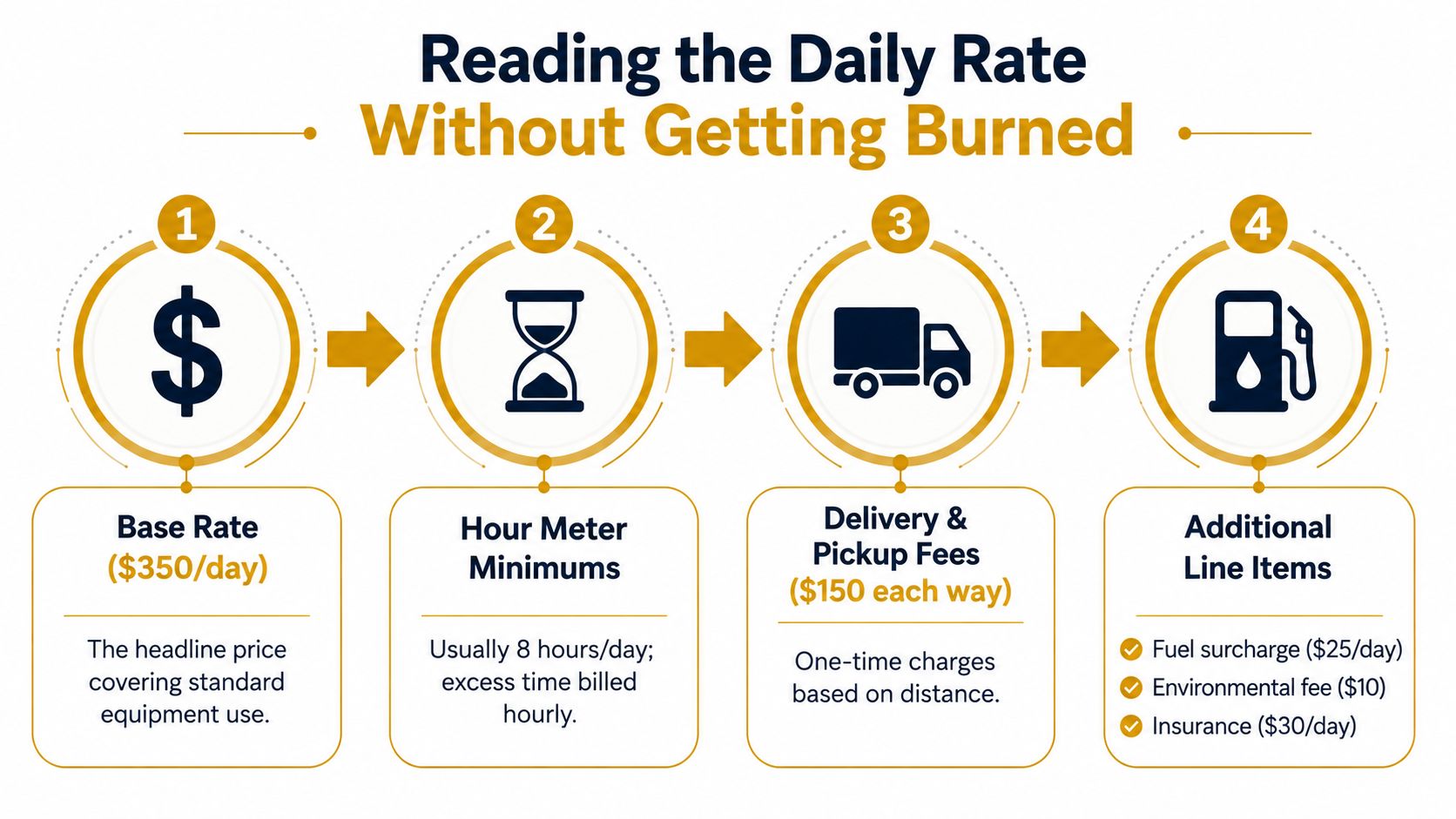
Read the quote line by line
The base rate generally covers standard use of the equipment for the stated rental period. It may not cover delivery and pickup, fuel, cleaning, environmental handling, tire or rough-terrain charges, express fulfillment, off-site use, taxes, or a damage waiver.
Meter rules can change the effective price. Some contracts define a rental day around an eight-hour operating limit, with additional usage billed hourly. Others define a 24-hour possession period. Confirm which clock applies, when the meter is read, and whether idle time counts.
Weekend returns deserve the same attention. A machine kept through a weekend may remain billable even if the crew doesn't operate it, and a return that misses the yard's receiving window can create another charge. Don't assume the calendar's “end date” means the equipment is off rent at that moment.
The verified e-commerce data points to about 70.22% average cart abandonment, rising to 80.39% on mobile, with extra costs too high identified by 48% of respondents, account creation by 24%, slow delivery by 22%, complicated checkout by 17%, and unclear full order cost by 16%, as reported in Marketix Digital's checkout abandonment analysis. Those figures aren't construction-specific, but they explain why transparent pricing and a short checkout matter for equipment buyers working from a phone on site.
Compare two quotes in the same order
Use this mental audit before selecting the cheaper screen price:
- Base rental rate and rental period.
- Meter minimum and excess-hour policy.
- Delivery and pickup, including round-trip treatment.
- Fuel, cleaning, environmental, tire, and rough-terrain charges.
- Express, after-hours, off-site, or special-access charges.
- Damage waiver, loss-damage waiver, insurance, deposit, and tax.
- Return condition requirements and late-return terms.
The equipment rental trend coverage from Staedean highlights the growing importance of digital booking while pointing to a practical information gap around delivery, rough-terrain access, express fulfillment, damage, and environmental charges. That gap is where many online comparisons fail. A contractor needs the final bill for the site, not an attractive daily rate detached from the delivery plan.
Booking the Right Dates and Delivery Window
Choose dates around productive possession, not the first date written on the project schedule. If the crew can't unload, inspect, and use the equipment on the selected start date, the rental clock is working against you.
Use the calendar carefully
Start with the first day the machine must be ready at the work face. Review the end date, weekend treatment, holiday availability, minimum rental period, and pickup cutoff before proceeding. Some platforms show a soft hold while the yard checks inventory, while others show a firm reservation only after payment or contract acceptance. Treat a soft hold as temporary until the confirmation states that inventory is locked.
The three-step path should be simple:
- Cart: Confirm the exact machine, attachment, quantity, start date, and end date.
- Details: Enter the complete delivery address, site contact, access notes, gate code, purchase order, and preferred delivery window.
- Payment: Review the final line-item total, protection choice, taxes, delivery, pickup, and add-ons before submitting payment.
Early-morning drops, after-hours pickups, express fulfillment, and difficult access can trigger charges or require manual approval. If the platform offers ETA notes, read the qualification language. “AM delivery” may be a window rather than a guaranteed arrival time.
Book the day you need the machine on site, not the day the project technically starts. Pad pickup by half a day for cleaning and loading.
For a three-day pour, the booking might look like this: select delivery for the day before placement if the crew needs staging and inspection, choose the three active work dates, and request pickup after cleanup on the following half-day. Put the pour sequence and access limitations in the order notes so dispatch understands why the delivery and pickup dates differ from the main work dates.
The online rental market is moving toward shorter, task-specific reservations and digital scheduling, according to mid-2025 construction rental trend coverage. That convenience helps only when the booking reflects the site sequence.
Handling Site Logistics and Washout Containment
A delivery succeeds before the driver arrives. Measure the route, clear the unloading area, and decide where the equipment will sit while it's on rent. Don't leave those decisions to a driver who has just reached a locked gate or soft shoulder.
Walk the delivery path
Confirm the entrance width, turning room, overhead clearance, slope, and ground bearing along the entire approach. Look beyond the gate. A route can accept the truck at the entrance and still fail at a narrow internal turn, a low branch, a utility crossing, or a soft shoulder.
Give dispatch a precise unloading point. Mark it with a site plan, photo, or pin if the booking system accepts one. Keep the machine accessible for fueling, inspection, attachment changes, and pickup. If you're placing equipment near a pour area, preserve a clear route for workers and concrete traffic instead of using the nearest empty patch.
Make washout containment specific
Concrete washout needs a designated, lined containment area that keeps slurry away from storm drains, curb inlets, soil, and surface water. A lined washout pan or a properly bermed wheel-wash station serves a different purpose from ordinary mud control. Concrete residue, tracked mud, paint, solvents, and other chemicals shouldn't be treated as one interchangeable waste stream.
Put the washout location in the online order notes. State whether the site has a pan, whether the rental company is expected to provide one, where the driver should place it, and whether the area is reachable without crossing fresh concrete or unstable ground. The yard can then ask the right questions before dispatch rather than discovering the problem during delivery.
Request these confirmations by email:
- Driver contact: Ask for the driver's name and cab phone when available.
- ETA window: Confirm the delivery window and how dispatch handles delays.
- Access instructions: Repeat the gate code, unloading point, and site contact.
- Containment responsibility: Confirm whether the yard supplies a washout pan or the contractor must provide it.
- Pickup condition: Ask what cleaning, emptying, and loading condition is required.
Site note: A washout pan is only useful if the truck, crew, and cleanup tools can reach it without bypassing containment.
Poor washout handling can create more than a cleanup dispute. It can attract municipal inspection attention, create corrective work, and interfere with the project's stormwater controls. Treat containment as part of mobilization, not as an accessory selected after the equipment order is complete.
Checkout Habits That Keep the Bill Honest
The cheapest rate rarely wins by itself. A low base price can lose its advantage after delivery, pickup, fuel service, rough-terrain handling, environmental charges, protection, taxes, and a second trip caused by an incorrect return date.
The checkout should answer three questions before payment: What am I receiving, when will it arrive, and what will I owe in total? If the platform can't answer those questions in a readable summary, pause and call the rental desk.
Audit the three screens
On the cart screen, verify the actual equipment configuration. A listing for a telehandler, lift, excavator, or washout container may show several capacity or attachment options. Confirm the selected item, included accessories, requested quantity, rental dates, and return method.
The details screen is where logistics become money. An incomplete delivery address can send dispatch into manual review. A missing purchase order can delay invoice processing. A vague site note can lead to a failed delivery, an access charge, or a driver waiting while the crew clears the route.
The payment screen is not merely administrative. Look for preselected fuel service, environmental handling, tire or rough-terrain charges, express service, delivery, pickup, taxes, deposits, and damage protection. Untick add-ons you don't need, but don't reject a waiver without understanding the contract's responsibility for damage, theft, loss, and downtime.
| Line Item | What It Covers | Question to Ask |
|---|---|---|
| Base rental rate | Equipment possession for the selected term | What exact machine and configuration does this rate cover? |
| Rental period subtotal | The calendar or meter-based rental charge | Does the end date include possession through pickup? |
| Delivery and pickup | Transport to and from the jobsite | Is this round trip, and what access conditions change it? |
| Fuel service | Fuel supplied, refueling, or a service charge | Do we return full, and how is missing fuel measured? |
| Environmental handling | Site, waste, or equipment-related environmental line items | Is this mandatory, and what does it specifically cover? |
| Tire or rough-terrain surcharge | Special transport or operating conditions | Does the route or site surface trigger this charge? |
| Damage waiver or protection | A contractual limit or coverage option | What exclusions, deductible, and documentation requirements apply? |
| Taxes and deposit | Government charges and payment security | Is the deposit separate from the final rental total? |
Compare payment choices honestly
Prepayment can simplify approval and sometimes changes the displayed rate, but it may reduce flexibility if weather or inspection moves the job. Invoiced billing can fit established contractor accounts better, yet it still requires a clean purchase order, named approver, and clear responsibility for extensions.
Compare the payment method with the protection plan. A damage waiver may have exclusions that matter on an active construction site, while a contractor's insurance may require specific documentation, limits, or notice. The correct choice depends on the contract and the risk you're prepared to retain, not on the label that sounds cheapest.
Construction rental software increasingly supports online availability, customer portals, digital contracts, inspection records, and scheduling workflows. Background material on construction equipment rental software capabilities describes features such as conflict detection, maintenance blocking, mobile field access, and digital documentation. Those features help the rental company keep inventory accurate, but the renter still needs to inspect the order summary and contract.
Save the record before the truck moves
Export the confirmation or take a screenshot of the final summary. Save the order number, selected dates, delivery instructions, price breakdown, waiver choice, and site contact. Then compare that record with the rental yard's emailed contract as soon as it arrives.
Look for drift in dates, transport, add-ons, taxes, protection, and return terms. If the contract differs, request correction before dispatch. After delivery, photograph the equipment or container, visible condition, meter, accessories, and placement. Those records support a clean check-in and give both sides a reference if the invoice changes.
Use this five-control check before the final click:
- Verify dates: Match possession, productive use, cleaning, and pickup.
- Verify address precision: Include the entrance, gate code, unloading point, and contact.
- Remove unneeded add-ons: Check fuel, protection, environmental, rough-terrain, and express selections.
- Choose the right waiver level: Read exclusions and compare them with your insurance requirements.
- Lock the site contact: Give dispatch someone who can answer the driver immediately.
For concrete crews, a specialized washout rental can belong in the same logistics review as the mixer, pump, finishing tools, and access plan. Reborn Rentals lists washout pans and containers for online rental, with a three-step Cart, Details, and Checkout process, delivery options, and published notes about possible delivery, rough-terrain, and express charges. Visit Reborn Rentals to check the available washout containment options, confirm site logistics, and place the right order before the pour schedule is exposed to a preventable delay.